
Chat Assignment
The Chat Assignment section allows you to control how incoming chats are routed to your agents. These settings help distribute workload efficiently, maintain consistency for returning users, and ensure each chat is handled by the right person.
Below are the chat assignment options available in Geta.ai.
1. Auto Assignment
Automatically distributes incoming chats among all agents who have Accepting Chats enabled.
Chats are assigned evenly to prevent overload.
When all agents reach their chat limit, new visitors are queued.
You can set each agent’s chat limit inside their profile.
2. Sticky Agent
Ensures returning visitors are automatically routed to the same agent they previously interacted with—if that agent is available.
Ideal for personalised support and conversation continuity.
Important:
When Sticky Agent is enabled, Assign Chat to Contact Owner is automatically disabled (to avoid conflict).
3. Assign Chat to Contact Owner
Automatically routes chats from known contacts to their designated Contact Owner, ensuring consistent and personalized support.
System Behavior:
This option is disabled automatically if:
Sticky Agent is enabled
OR Assign Agent as Contact Owner is enabled
This prevents overlap between assignment rules.
4. Assign Agent as Contact Owner
When a chat is assigned to an agent and the contact does not already have an owner, this setting automatically assigns that agent as the Contact Owner.
Key Notes:
Existing contact owners are never overwritten.
Enabling this setting will disable Assign Chat to Contact Owner.
Confirmation Popup
When you enable this option, you will see a confirmation message:
"Enabling Assign Agent as Contact Owner will disable Assign Chat to Contact Owner. Do you want to proceed?"
You must click Confirm to continue save changes.
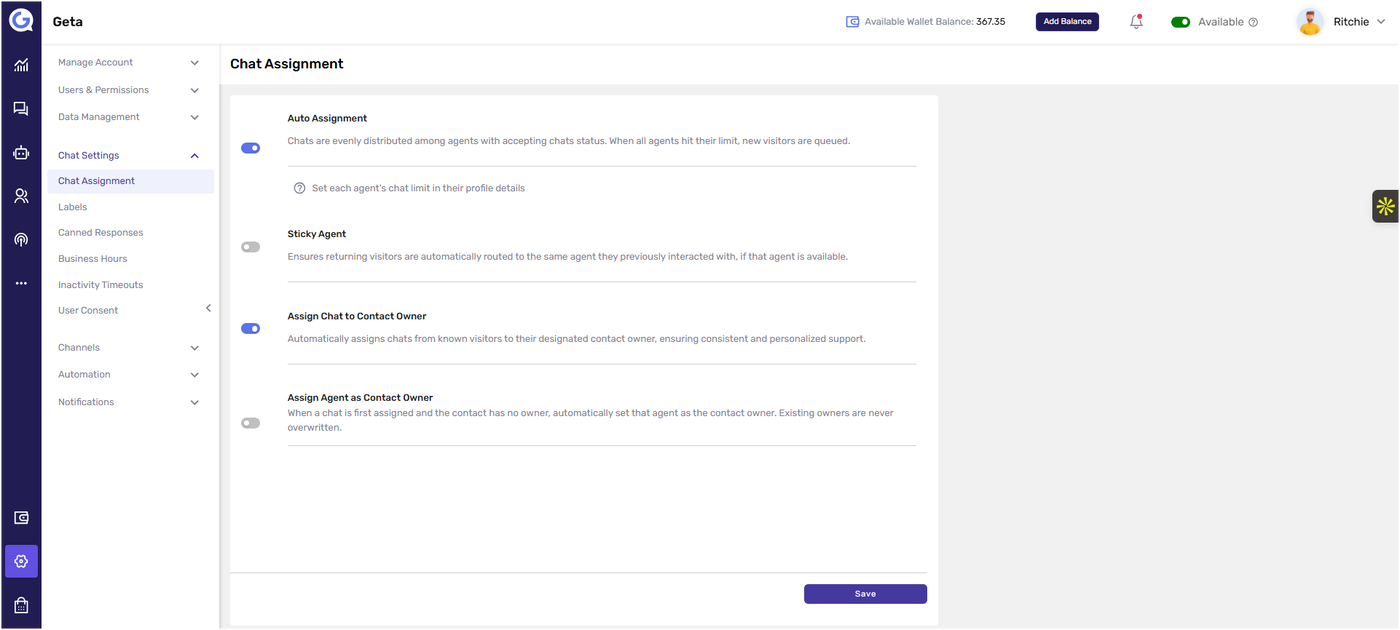
Saving Changes
After enabling or disabling any option, click Save at the bottom to apply your changes.